

Student data intelligence
Student analytics that doesn't wait to be opened.
NAPLAN, PAT, attendance, medical and pastoral data in one view — plus a threshold engine that writes the follow-up work, names the student, and drops it in the right person's queue. Privacy-first AI and your own wellbeing surveys included.
Power BI dashboards nobody opens, static spreadsheets, and manual IT data requests.
Why it is different
The part that changes how the day runs, rather than what the day looks like afterwards.
It does not wait to be opened.
Every analytics product a school has been sold so far is passive. The data is correct, the charts are good, and the dashboard sits there until somebody with a spare half hour goes looking. In a school nobody has the spare half hour, so the insight arrives after the conversation it was supposed to inform.
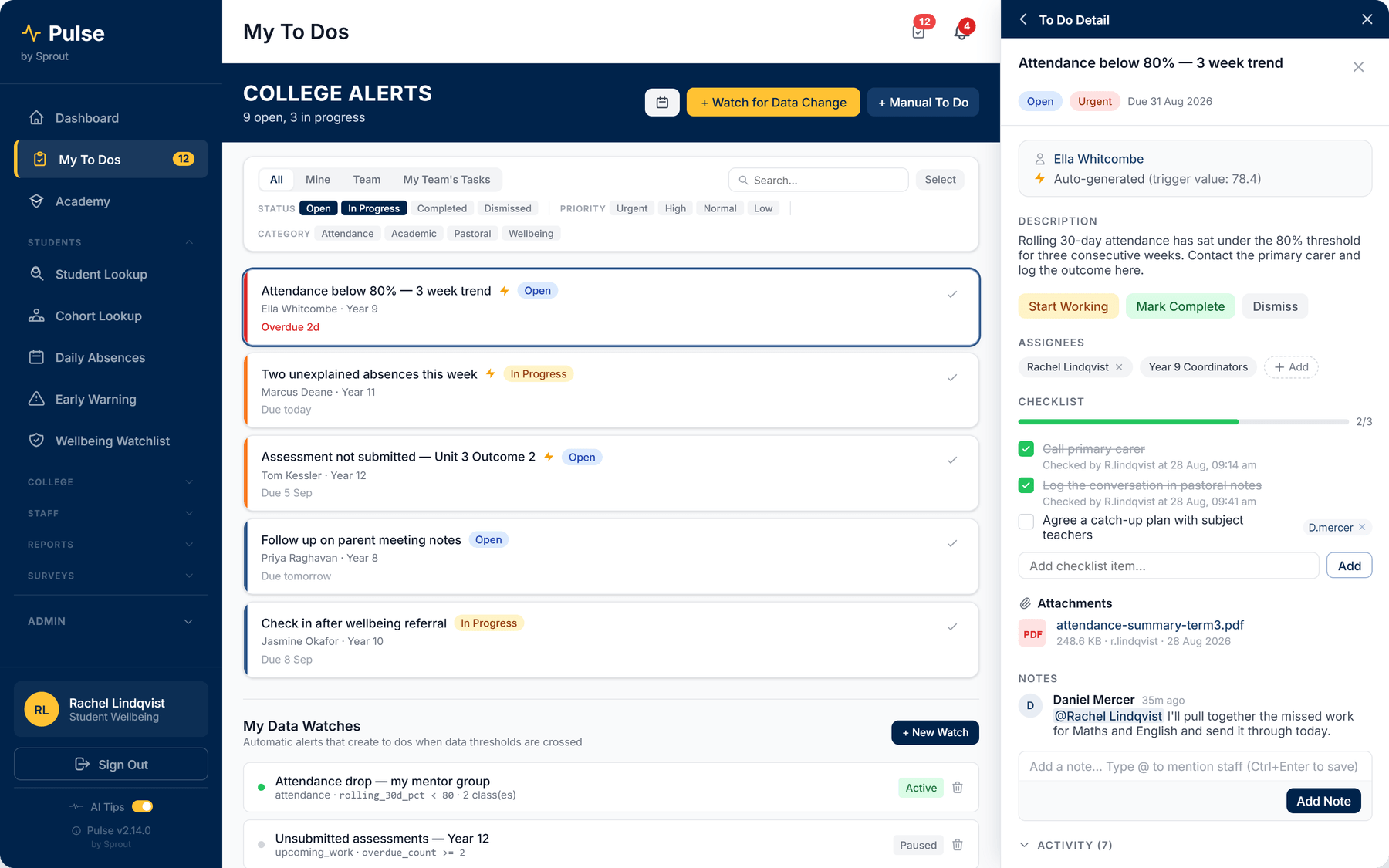
Pulse inverts that. You set a data watch once — rolling 30-day attendance under 80% for your mentor group, two or more overdue assessments in Year 12 — and when a student crosses it, Pulse writes the to-do. It names the student, records the value that triggered it, and lands in the queue of the person whose job it is.
From there it behaves like work rather than like a report: a due date, a priority, a checklist, and somebody's name against it. It is open, in progress, completed or dismissed, and there is a record either way. Pulse does not score a child, rank a cohort or produce a risk number.
- Auto-generated from your own thresholds, with the trigger value attached.
- Assigned to a person or a team, so it cannot be everyone's job and therefore nobody's.
- A checklist showing who did which step, and when.
- Notes with @mentions, attachments and a full activity trail.
- Manual to-dos sit in the same queue, so nothing lives in a separate list.
- Dismissing one is a recorded decision, not a thing that quietly vanishes.
Pulse by Sprout
Turns student data into assigned to-dos, before anyone thinks to look.
What it does.
Thresholds you set once
Define the threshold in the school's own terms — rolling attendance under 80%, two or more overdue assessments — and Pulse checks it for every student, every day, raising the work when it is crossed.
360° student and cohort analytics
A unified view of NAPLAN, PAT, attendance trends, medical alerts and pastoral notes, across classes, houses and year levels — there for when you do want to dig.
One queue, filtered to you
Yours, your team's, or the whole school — filtered by status, priority and category, so a wellbeing lead and a year-level leader open the same system and see different work.
Privacy-first AI, and your own surveys
Ask questions in plain language with PII de-identification applied before the query runs, and build wellbeing surveys with live trend analysis without commissioning a separate survey tool.
I used to find out in week 6 that a student had been slipping since week 2. Now the task is sitting there on the Monday, with the student named and the reason attached.
Shared platform
The part that makes the suite worth more than the app.
One student record, shared across the suite.
Pulse runs on the same student record, the same sign-in and the same permission model as every other Sprout app. Staff do not maintain a second list of people, and a change made once is a change everywhere.
It connects to:
- Student information systems
- Learning management systems
- Single sign-on providers
Talk to us
The useful first conversation is about what you already run.
Tell us about your school.
Pulse is available now. Schools often start with one app and add the rest as they go, which is exactly how Sprout is designed to be adopted. We will quote it against your enrolment and what you are already running.